
Choose your computer and follow the steps. TrueNest Pro installs in a few minutes.
Install on Mac (.zxp file)
Download the .zxp file
Right after your order, download the file that ends in
.zxp.Cannot find it? Write to support@gettruenest.com.
Quit Illustrator
Quit Illustrator completely with Cmd+Q. Closing your documents is not enough.
Get Extension Manager
Download Anastasiy's Extension Manager from install.anastasiy.com. Install it, then open it.
You can also use the ZXP/UXP Installer from aescripts.com: drag the
.zxpfile onto it.Choose your Illustrator
In the left column, click your version of Illustrator. Then click Install, top left.
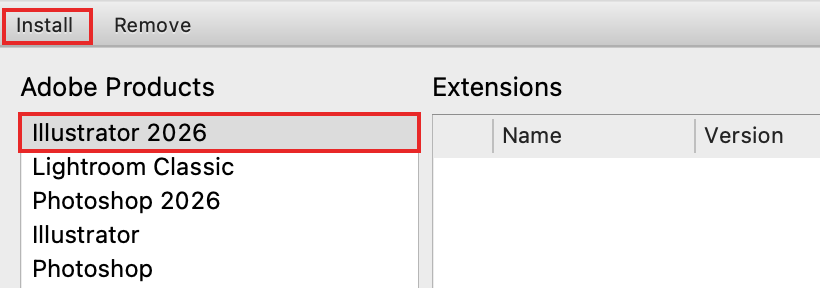
Pick the .zxp file
Choose the TrueNest Pro
.zxpfile, usually in your Downloads folder. TrueNest Pro now shows in the list on the right.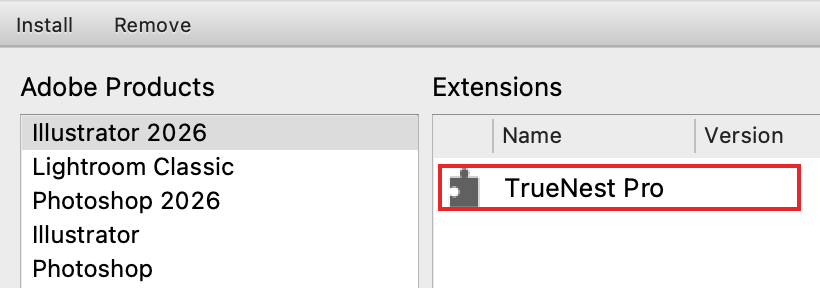
Installed: TrueNest Pro is in the list. Its version number is hidden here. Open the panel
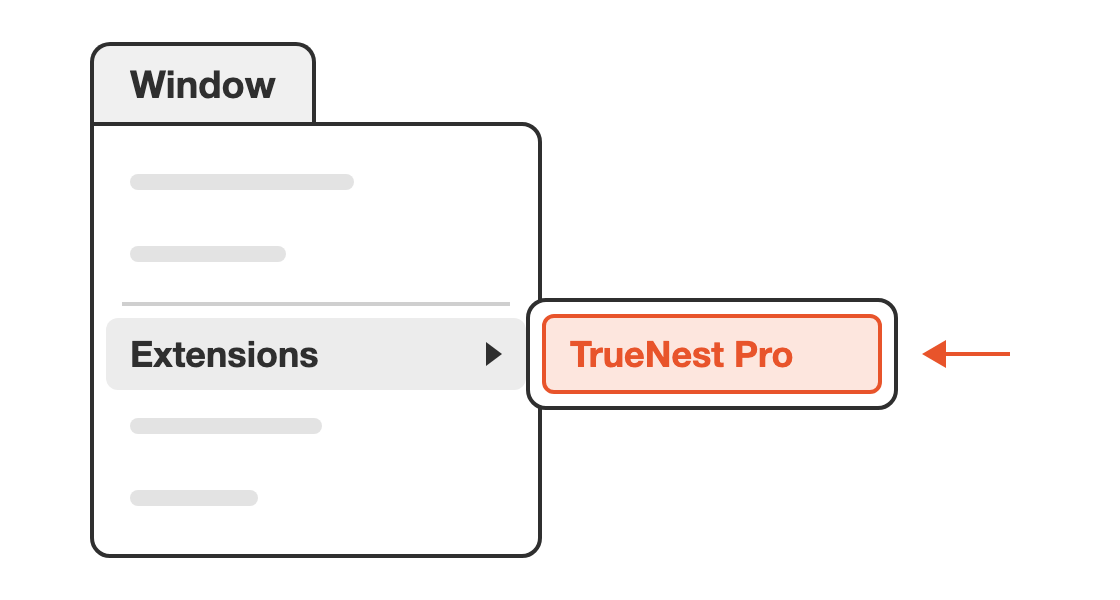
Open Illustrator again. Choose Window > Extensions > TrueNest Pro.
Nothing else to set up: the panel handles the macOS block on downloaded files by itself.
Activate TrueNest Pro
- The panel opens on the Activate TrueNest card.
- Copy your key from the e-mail. It starts with
TN-. - Paste it and click Activate. The card disappears: you are ready.
Look for the e-mail “Your TrueNest license key”, or “Your TrueNest 7-day free trial” for the free trial. Not there? Check your spam folder.
Activation needs internet. After that, open the panel with internet at least once a week.
Computers, offline use and licence messages: Licences and computers.
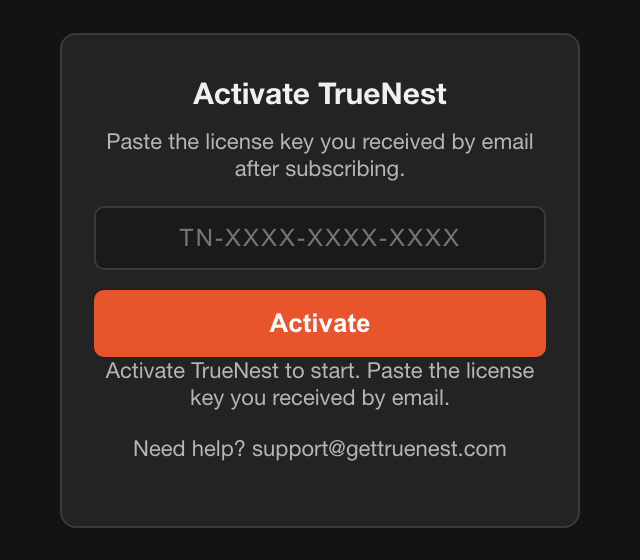
The grey line under the button is normal until your key is active.
The golden ruleAfter installing, updating or renewing, quit Illustrator completely and open it again.
Something went wrong?
Your valid key is refused right after installing, updating or renewing.
Quit Illustrator with Cmd+Q and open it again. Until then, the panel keeps its old answer.
The panel says “macOS blocked the ... because it arrived from a download.”
Quit Illustrator, open it again and try once more. Still blocked? Write to support@gettruenest.com.
Several TrueNest entries in Window > Extensions, or an old version number at the top right.
Do a clean reinstall:
- Quit Illustrator. In Extension Manager, select each old TrueNest entry and click Remove.
- In the Finder, choose Go > Go to Folder and paste this path.
/Library/ Application Support/ Adobe/ CEP/ extensions - Move every folder with TrueNest or truenest in its name to the Trash. Your licence is not in these folders.
- Do the same with this path.
~/Not found? Nothing to do there.Library/ Application Support/ Adobe/ CEP/ extensions - Install the
.zxpfile again, then open Illustrator.
The Mac may ask for a password: it is the password of your user account.
A Rotations menu shows in More options.
Quit Illustrator and open it again. Still there? Do a clean reinstall.
The panel says “Your subscription is not active.”
Just renewed? Quit Illustrator completely and open it again. Otherwise, check your subscription in your customer account.
The panel says “Unknown key.”
Copy the key again from the e-mail, in full, with TN-.
The panel says “This licence is already used on its maximum number of computers.”
Every computer of your licence is in use. Write to support to free the old one. Or add a subscription with the same e-mail address.
The panel says “Something answered instead of the licence server”.
A filter on your network blocks the panel. Try another network, such as your phone's hotspot.
Still not working?
Write to support@gettruenest.com. Add a screenshot of the panel and the name of the file you installed.
Install on Windows (.zip file)
Download the .zip file
Right after your order, download the file that ends in
-windows.zip. No installer and no administrator rights needed.Do not double-click the
.zxpfile. On many PCs, WinRAR takes it over and the installation fails.Quit Illustrator
Quit Illustrator completely with Alt+F4. Closing your documents is not enough.
Extract the .zip file
Right-click the
-windows.zipfile. Choose Extract All, then Extract.A folder opens. It holds a
TrueNest Profolder.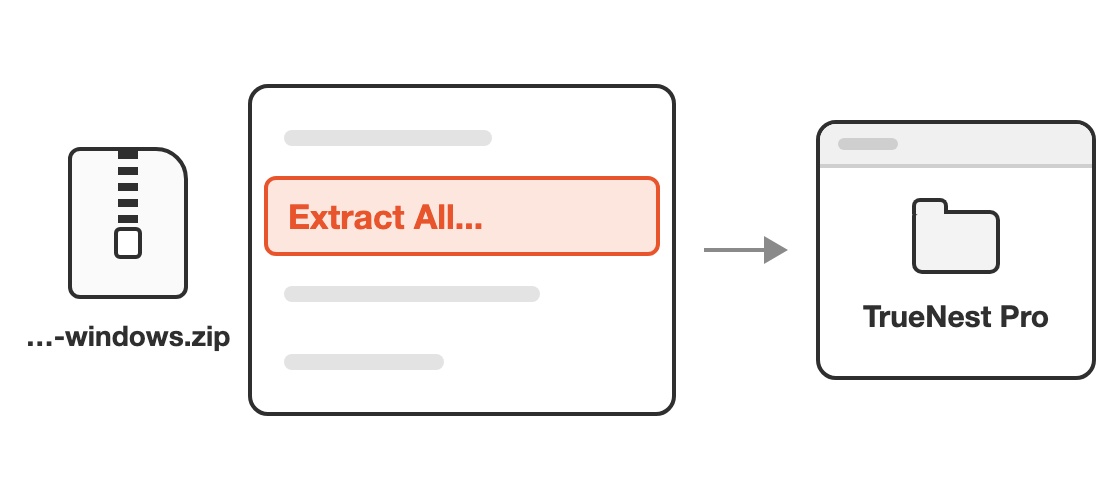
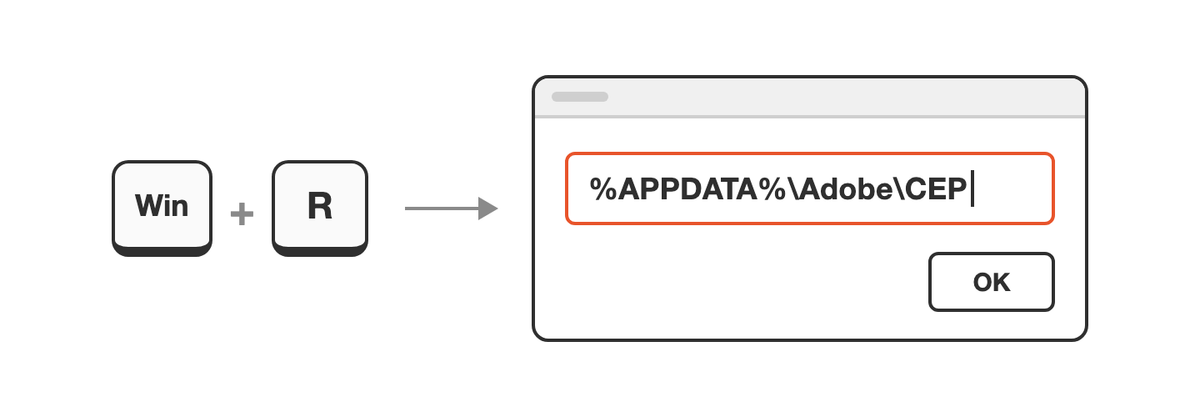
Open the CEP folder
Press Win + R. Type or paste the path below, then click OK.
%APPDATA%\Adobe\ CEP Do not look for this folder by hand: Windows hides it.
Add an extensions folder
No
extensionsfolder? Right-click an empty area, choose New > Folder and name itextensions.Copy the TrueNest Pro folder
In the extracted folder, click
TrueNest Proonce and press Ctrl+C. Openextensionsand press Ctrl+V.Check:
TrueNest Prosits directly inextensions, with aCSXSfolder right inside.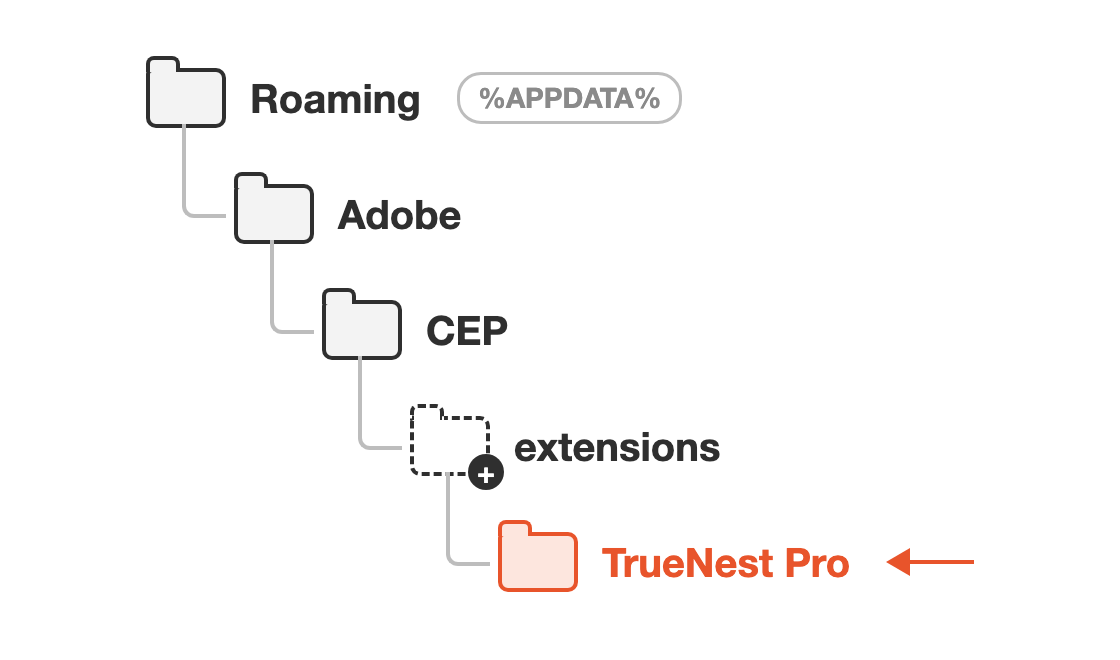
Create extensions if it is missing. TrueNest Pro goes directly inside it. Open the panel
Open Illustrator. Choose Window > Extensions > TrueNest Pro.
Activate TrueNest Pro
- The panel opens on the Activate TrueNest card.
- Copy your key from the e-mail. It starts with
TN-. - Paste it and click Activate. The card disappears: you are ready.
Look for the e-mail “Your TrueNest license key”, or “Your TrueNest 7-day free trial” for the free trial. Not there? Check your spam folder.
Activation needs internet. After that, open the panel with internet at least once a week.
Computers, offline use and licence messages: Licences and computers.
The grey line under the button is normal until your key is active.
The golden ruleAfter installing, updating or renewing, quit Illustrator completely and open it again.
Something went wrong?
You double-clicked the .zxp file and the installation failed.
On many PCs, WinRAR takes over .zxp files. Use the -windows.zip file and the steps above.
No Extract All when you right-click the file.
WinRAR or 7-Zip handles .zip files on this PC. Choose their Extract to option followed by the file name. On Windows 11, click Show more options first.
Windows cannot find the CEP folder.
Press Win + R, paste the path below and click OK. Create a folder named CEP there, then open it.
%APPDATA%\
In extensions, a folder ends in -windows, or a TrueNest Pro folder holds a second one.
The right TrueNest Pro folder has CSXS directly inside. Move that one directly into extensions. Then delete any empty folder left there.
Your valid key is refused right after installing, updating or renewing.
Quit Illustrator with Alt+F4 and open it again. Until then, the panel keeps its old answer.
Several TrueNest entries in Window > Extensions, or an old version number at the top right.
Remove the old folders:
- Quit Illustrator. Press Win + R, paste this path and click OK.
%APPDATA%\Adobe\ CEP\ extensions - Delete every folder with TrueNest or truenest in its name.
- Copy the new
TrueNest Profolder in, then open Illustrator.
Still several entries? Ask support@gettruenest.com for the clean reinstall file.
A Rotations menu shows in More options.
Quit Illustrator and open it again. Still there? Ask support for the clean reinstall file.
The panel says “Your subscription is not active.”
Just renewed? Quit Illustrator completely and open it again. Otherwise, check your subscription in your customer account.
The panel says “Unknown key.”
Copy the key again from the e-mail, in full, with TN-.
The panel says “This licence is already used on its maximum number of computers.”
Every computer of your licence is in use. Write to support to free the old one. Or add a subscription with the same e-mail address.
The panel says “Something answered instead of the licence server”.
A filter on your network blocks the panel. Try another network, such as your phone's hotspot.
Still not working?
Write to support@gettruenest.com. We send you an automatic installation file. Then:
- Quit Illustrator. In your Downloads folder, keep only the newest
-windows.zipfile. - Open the Start menu, type
powershelland open Windows PowerShell. - Double-click the file from support. It opens in Notepad.
- Copy only the text between the two dashed lines, from
& {to the last}. - Paste it into PowerShell and press
Enter. When Installed appears, open Illustrator.
Prefer everything in one document? Download the full TrueNest Pro guide as a PDF (in English).